&w=3840&q=75)
- Payments
Three Ways Businesses Are Using Payment Links to Keep Payments Secure and Simple
Payment Links let you send secure payment links via email, SMS, or messages.
Use Payment Links for high‑value transactions to improve security and convenience.
Send links for deposits, pre‑orders, or pre‑bookings to secure customer payments.
Generate links to accept gift voucher payments professionally and easily.
Payment links improve cash flow by making payment simpler and faster.
In the service industry, taking payment hasn't always been as straightforward as tapping a card. Now it is, thanks to Payment Links, a handy feature available with Zeller Virtual Terminal.
As a service provider, you deal with instalments, deposits, prepayments, higher transaction values, and ultimately, customers who aren't present when it comes time to pay. Traditionally, this has meant chasing up invoices or making repeated phone calls to accept a payment. Nowadays, technology is affording a much smoother payment experience for these types of transactions. With Zeller Virtual Terminal, businesses can accept card payments by sending their customers a secure payment link, which lets them enter their card details in their own time. It's simple, secure, and fast, and businesses from all industries are adopting it. Below, we explain three of the most common uses for Payment Links and why they’re a handy solution to have in your back pocket to help keep your cash flow healthy, and your customers happy.
What is a Payment Link?
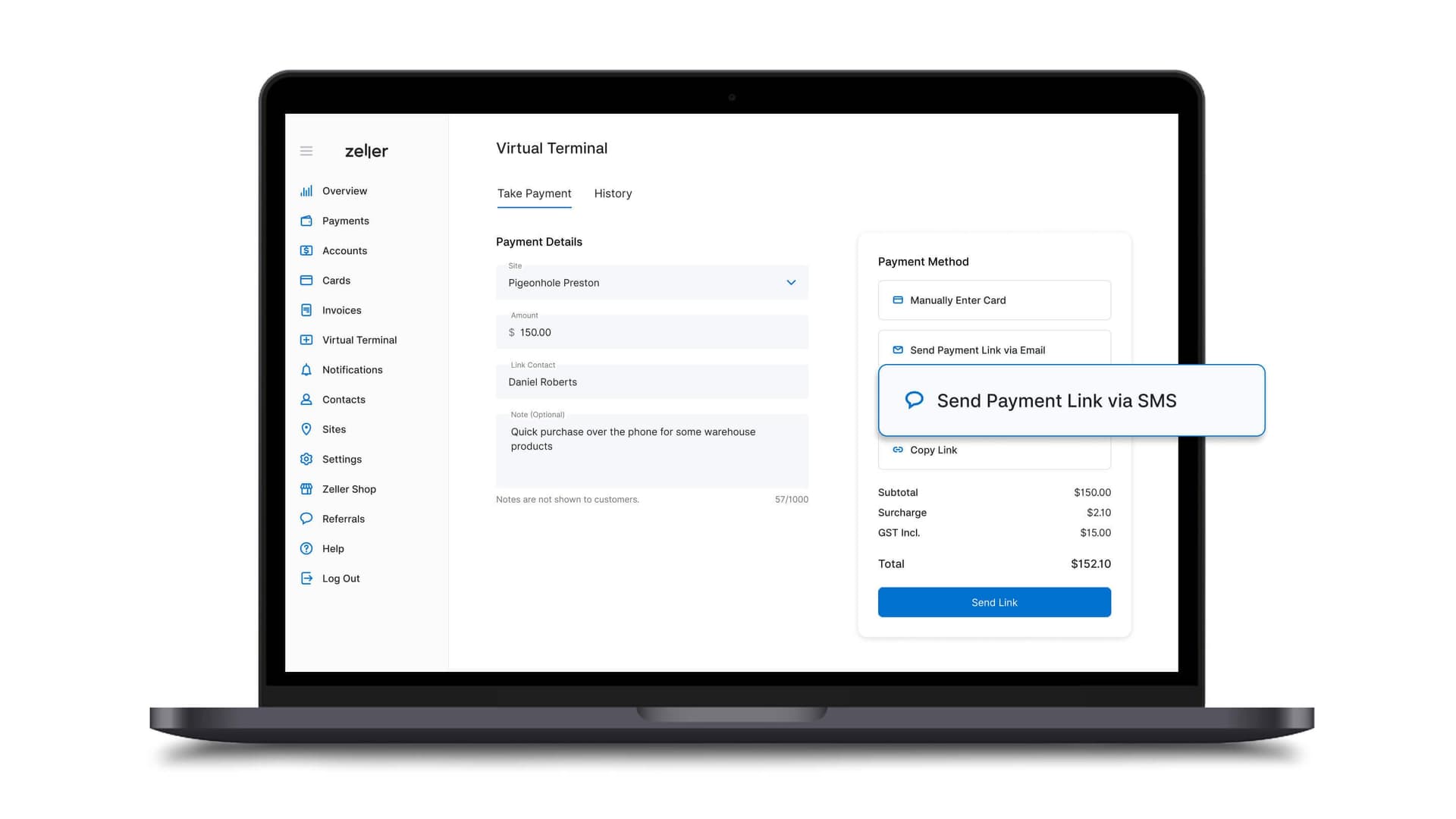
Payment Links are a payment solution available on Zeller Virtual Terminal, a web-based tool that lets you process payments without the need for a physical EFTPOS machine. It enables businesses to generate a secure payment link and send it to their customer, who can then enter their card details in their own time.
You can create and send a payment link from Zeller Dashboard, or straight from your phone with Zeller App — handy if you're on the road, on-site with a customer, or away from your desk. Either way, simply navigate to Virtual Terminal (or Payment Link in the app) and choose how to send it: Send Payment Link via Email, Send Payment Link via SMS, or Copy Link. Choosing the latter means you can share the link on whatever platform is most convenient for your customer, be it WhatsApp, iMessage, or Facebook Messenger.
The link directs customers to Zeller's secure payment page, where they can enter their card details and proceed with the payment. Every transaction is protected by 3D Secure (3DS), an added identity check that may prompt your customer's bank to verify the payment — either by authorising it instantly or by sending a one-time code for the customer to enter. This extra step helps reduce fraud and unauthorised payments, giving both you and your customer confidence that the transaction is legitimate. Once the payment has been processed, customers have the option to download a copy of their receipt.
What are the most common uses of Payment Links?
1. For high-value transactions
Whether you're selling kitchens, cars, or wedding dresses, you'll know how important the customer experience is in the transaction process. When a customer is about to hand over a large sum of money, they need to be given the white-glove treatment. And when your business relies on fewer but higher-value transactions, those payments need to be made promptly and securely to keep your cash flow healthy. For these reasons, Zeller's Payment Links are a great solution.
On the customer side, it offers convenience and peace of mind, knowing that their card details are shared securely and privately, with the added benefit of being able to pay with American Express — particularly advantageous for high-value purchases.
For you as a business owner, it keeps fees low while keeping you protected. With Zeller Virtual Terminal, you pay one low, flat transaction fee of 1.75% + 25c and benefit from a dedicated anti-fraud team, 24/7 transaction monitoring, and 3D Secure protection on every Payment Link transaction. When you're dealing with high-value transactions and can't always verify that the customer is who they say they are, that extra layer of bank-side identity verification is especially valuable in helping you avoid falling victim to credit card fraud.
2. For deposits, pre-orders, and pre-bookings
No matter what kind of business you run, there's likely to come a time when you'll need to take a deposit or secure a service or item for your customer with a pre-order or pre-payment. Restaurants do it for large group bookings, hotels do it to reserve event spaces or accommodate special catering requests, and retailers do it to guarantee the sale of high-value or custom-made items. In these situations, Payment Links don’t just help you get paid fast — they also make the reconciliation process much easier.
When you create your payment link with Zeller Virtual Terminal, you can enter all the relevant details about the transaction in the notes section, such as the pick-up date, the job number, whether it's one instalment of many, or the name of the person handling the sale. If your business has a number of different departments — a hotel might have the front office, the pool bar, the corporate space, the rooftop, and the massage room, for example — you can create a different Site for each, and quickly assign each Payment Link transaction to the relevant one. Being able to create links from Zeller App also means staff can take a deposit on the spot, wherever they are on-site, rather than waiting until they're back at a computer.
When it comes time to reconcile your sales at the end of the month, payments can easily be filtered in Zeller Dashboard by site, date, status (approved, declined, or refunded), transaction value, and reference number.
3. For gift vouchers
Many businesses don't have a formalised process for selling gift vouchers, and yet it's important not to deny customers this option if they specifically ask for one. Generating a payment link is an ultra-simple, quick, and professional way to accept gift voucher payments.
Simply generate a payment link with Zeller Virtual Terminal, send it to your customer, and ask them to download a receipt once their payment has been processed. This receipt will contain a unique reference number. Write the reference number down on a gift certificate, or ask your customer to pass it on to the gift recipient. When the recipient comes to redeem their voucher, your staff simply need to search that reference number in Zeller to bring up the associated transaction and add a transaction note to indicate that the voucher has been redeemed.
&w=1920&q=75)
Get started with Payment Links today
Sign up for a fee-free Zeller Account in minutes and gain access to a suite of financial management tools — no branch visit or lengthy paperwork required.
&w=3840&q=75)
&w=3840&q=75)
&w=3840&q=75)